


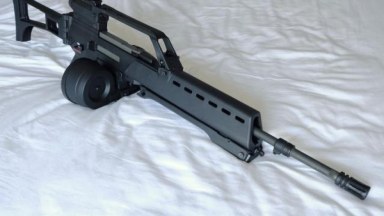
Mod

Krugger 36 LMG (Heckler & Koch MG36) M16A2
REPLACES M16A2 RIFLE REPLACES M16A2 RIFLE REPLACES M16A2 RIFLE

Sharing is temporarily disabled
Fooling around with scripts, searching for a way to give infinite ammo to the M60 and I found it. Thanks, weapon_chainsaw.txt!

Since I am a generous person, I shall share with you (those still playing and modding L4D2) a gem.

The key to infinite ammo:

After extracting your favorite M60 script, open "weapon_rifle_m60.txt" in Notepad(++) and change the "clip_size" "150" line to "clip_size" "999999999" (12 9s) and ADD THE FOLLOWING LINE JUST BELOW "clip_size" line that you just edited:

"ITEM_FLAG_NOAUTORELOAD" "1"


Save "weapon_rifle_m60.txt" and repack your addon with VPK Packer. DONE!

!!!!!!!!NOTES!!!!!!!!!
No need for reload anim, cuz reloading is skipped entirely!
No need to change ammo type to Pistol or Pistol_Magnum for infinite reserves!
This will work with game_mode.txt edits giving "infinite reserves" for the M60 (those adding "ammo_M60_max	-2" line), in which case "999" will show under the main bullet counter ("250").
When the M60 is picked up, after adding this to your addon, the bullet counter may show "0". Fire off a round, the counter recycles to "250" and will cycle down to "0" and keep cycling as long as you hold the trigger (from 250 to 0, 250 to 0, and so on). If you have your script for M60 with Pistol or Magnum ammo for infinite reserves, the reserve counter will never cycle away from "999". If you do not have infinite reserves script edits (game_mode.txt or weapon_rifle_m60.txt), only the main bullets count shows, cycling down from 250. Either way, this edit works for infinite ammo in a true sense.

Sample on default m60 script, search for "sxorpiologix" to find the lines easily:
WeaponData
{
	// Terror-specific Data --------------------
	"VerticalPunch"			"2"
	"SpreadPerShot"			"1.6"
	"MaxSpread"				"35"
	"SpreadDecay"			"7"
	"MinDuckingSpread"		"0.5"
	"MinStandingSpread"		"1"
	"MinInAirSpread"		"3"
	"MaxMovementSpread"		"6"
	"AddonAttachment"		"primary"
	"Team" 					"Survivor"

	"Tier"					"0"		// valid entries are 0, 1, 2

	"ResponseRulesName"		"M60"

	// particle muzzle flash effect to play when fired
	"MuzzleFlashEffect_1stPerson"		"weapon_muzzle_flash_assaultrifle_FP"
	"MuzzleFlashEffect_3rdPerson"		"weapon_muzzle_flash_assaultrifle"

	// model for the shell casing to eject when we fire bullets
	"EjectBrassEffect"		"weapon_shell_casing_rifle"

	// Used in the music system when this weapon fires
	"MusicDynamicSpeed"		"0.35"

	"DisplayName"				"#L4D_Weapon_M60"
	"DisplayNameAllCaps"		"#L4D_Weapon_M60"

	"NewInL4D2"				"1"

	// 360 Terror Data
	"MaxAutoAimDeflection1"			"10.0"
	"MaxAutoAimRange1"			"0"
	//This value determins how "big" a target is for auto aim. If a target is 10.0 units big then it is considered 10.0*scale.
	//You can think about this value controlling a falloff value on distant targets, the smaller the value the harder it is to hit at a distance.
	"WeaponAutoAimScale"			"1.0"
	// End Terror-specific Data ----------------

	"Rumble"			"4"

	"MaxPlayerSpeed" 		"230"
	"WeaponType" 			"rifle"
	"WeaponPrice" 			"3100"
	"WeaponArmorRatio" 		"1.4"
	"CrosshairMinDistance" 		"4"
	"CrosshairDeltaDistance" 	"3"
	"BuiltRightHanded" 		"1"
	"PlayerAnimationExtension" 	"m4"

	"CanEquipWithShield"		"0"


	// Weapon characteristics:
	"PenetrationNumLayers"		"2"
	"PenetrationPower"			"50"
	"PenetrationMaxDistance"	"0"	// none

	"Damage"			"50"
	"Range"				"3000"
	"RangeModifier"			"0.97"
	"GainRange"			"1500"	// range at which to use a gain curve to fall off to zero
	"Bullets"			"1"
	"CycleTime"			"0.11"

	"TimeToIdle"			"1.5"
	"IdleInterval"			"60"

	// Weapon data is loaded by both the Game and Client DLLs.
	"printname"			"M60"

	"playermodel"			"models/w_models/weapons/w_m60.mdl"

	"viewmodel"			"models/v_models/v_m60.mdl"
	"CharacterViewmodelAddon"
	{
		"Coach"				"models/weapons/arms/v_arms_coach_new.mdl"
		"Mechanic"			"models/weapons/arms/v_arms_mechanic_new.mdl"
		"Producer"			"models/weapons/arms/v_arms_producer_new.mdl"
		"Gambler"			"models/weapons/arms/v_arms_gambler_new.mdl"
	}

	"anim_prefix"			"anim"
	"bucket"			"0"
	"bucket_position"		"0"

	//"clip_size"		"150"	//original specs, sxorpiologix
	"clip_size"	"999999999"	//infinite ammo specs, sxorpiologix
	"ITEM_FLAG_NOAUTORELOAD" "1"	//infinite ammo specs, sxorpiologix

	"primary_ammo"			"AMMO_TYPE_M60"
	"secondary_ammo"		"None"

	"weight"			"25"
	"item_flags"			"0"

	"LoadoutSlots"	"2"

	// Sounds for the weapon. There is a max of 16 sounds per category (i.e. max 16 "single_shot" sounds)
	SoundData
	{
		"single_shot"		"M60.Fire"
		"shoot_incendiary"	"M60.FireIncendiary"
	}

	// Weapon Sprite data is loaded by the Client DLL.
	TextureData
	{
		"weapon"
		{
				"file"		"vgui/hud/iconsheet_dlc1"
				"x"			"0"
				"y"			"0"
				"width"		"256"
				"height"	"64"
		}
		"ammo"
		{
				"file"		"vgui/hud/iconsheet"
				"x"			"384"
				"y"			"448"
				"width"		"64"
				"height"	"64"
		}
		"crosshair"
		{
				"file"		"sprites/crosshairs"
				"x"			"0"
				"y"			"48"
				"width"		"24"
				"height"	"24"
		}
		"autoaim"
		{
				"file"		"sprites/crosshairs"
				"x"			"0"
				"y"			"48"
				"width"		"24"
				"height"	"24"
		}
	}
	ModelBounds
	{
		Viewmodel
		{
			Mins	"-10 -2 -13"
			Maxs	"30 10 0"
		}
		World
		{
			Mins	"-8 -9 -6"
			Maxs	"29 9 8"
		}
	}
}

REPLACES M16A2 RIFLE REPLACES M16A2 RIFLE REPLACES M16A2 RIFLE

This is my own Mod Collection called "Modern Warfare 4"! It includes: 8 Weapons in One Pack. :) + One Bullet Reload Plugin is Required. Credit: Call of Duty - Activision

正在逃避绿流感的求生四人组,在逃离期间整片天空突然失真,眼前开始渐白,四人组被强行拉入了E.Y.E的赛博异度幻境之中。这是一场突发的时空穿越,被异维能量篡改的全新噩梦。随着四人组继续的深入,最终抵达“终焉之门”并击败了守门者“炎魔”,借助门的时空...
![CODMW2026 M4 - m16a2 [Sound fix Ver]](/imgmgr/limit/img/addons/l4d2/thumb/codmw2026_m4_-_m16a2__sound_fix_ver_.jpg?1790364945&w=384&h=216 "CODMW2026 M4 - m16a2 [Sound fix Ver]")
CODMW2026 M4 - m16a2 [Sound fix Ver] Call of Duty: Modern Warfare 4 (2026) M4 [USASOC/NSW M4A1 URG-I. 11.5" barrel - 5.56x45mm NATO] Assault Rifle skin. Left 4 Dead 2 M16A2 Assault Rifle replacement skin. scripts More hud icon...

reupload for archival purpose all credits goes to Blaine & aace666 for creating this beautifull custom maps 描述 当新年的钟声响起时,往日热闹的新春景象不复存在,只剩下感染者在街道上游荡着。 在数日前,军队曾试图夺回这个重要的城市...